
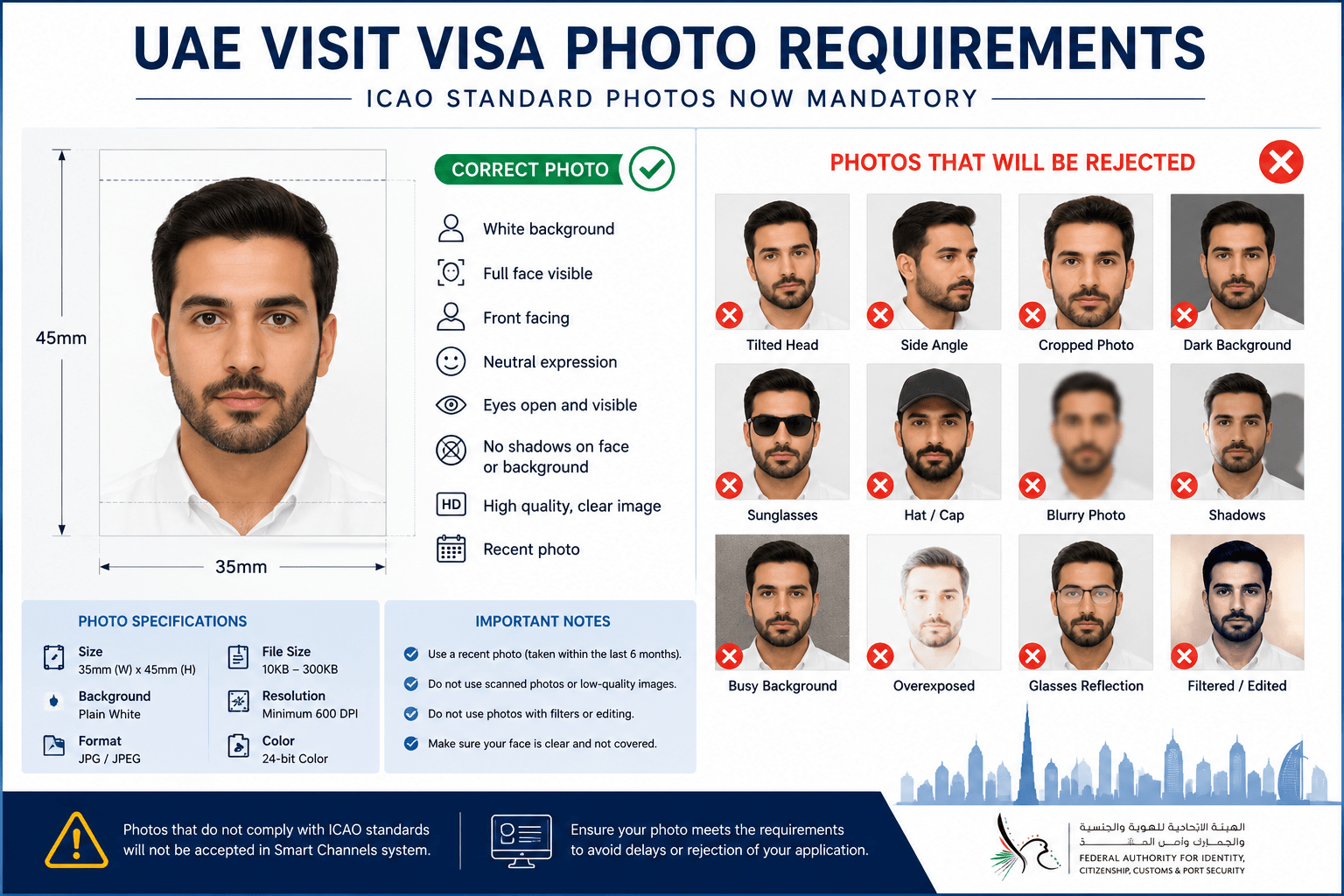
UAE immigration has introduced a new validation step for Visit Entry Permit services processed through
Smart Channels: personal photos are now screened against ICAO photo standards.
If the uploaded image fails the system checks, it may be not accepted and the application can be delayed or returned.
Official Immigration Update (Photo Requirement Notice)
Dear System Users,
Greetings,
Please be informed that ICAO standards for the required personal photos have been implemented for Visit Entry Permit
services within the Smart Channels system.
Accordingly, personal photos that do not comply with the approved ICAO requirements and standards will not be accepted.
Thank you for your cooperation.
What Changed in Smart Channels?
Earlier, a photo could sometimes pass even if it was not perfectly formatted. Now, Smart Channels appears to perform
a stricter automated check before the application moves forward. In simple terms: if the system cannot “read” the face clearly,
it may stop the submission or push it back for correction.
Why this matters
- It can affect first-time submissions (extra back-and-forth)
- It can delay processing timelines
- It can cause re-upload requests even when all other documents are correct
Why Previously Accepted Photos Are Suddenly Failing
The biggest difference is not “new rules on paper” — it’s stronger system validation. Many images that look “fine”
to humans fail automated checks because of compression, shadows, editing, or incorrect framing.
Most common triggers we’re seeing
- WhatsApp compression (image becomes soft/pixelated)
- Cropped selfies where the face is too close or off-center
- Edited backgrounds that leave rough edges or blur halos
- Shadows on the wall or across the face
- Glare/reflection on glasses that hides the eyes
- Beauty filters that change skin texture and facial details
What an ICAO-Compliant Visa Photo Looks Like (Practical Version)
Instead of over-complicated technical language, use this practical rule:
upload a fresh passport-style photo that looks clean, natural, and unedited.
Minimum expectations for Smart Channels acceptance
- Plain, clean background (no patterns, no objects behind you)
- Face fully visible and front-facing (not angled)
- Even lighting (no dark areas, no harsh spotlight)
- Original image quality (avoid screenshots and chat-app downloads)
- No filters, no heavy retouching, no “AI enhancement”
Quick test before you upload
- Zoom in: if the face looks soft or “painted,” don’t upload it.
- Check edges: if hair/ears look cut out, don’t upload it.
- Check eyes: if glare hides eyes, retake the photo.
Best Way to Take a Photo That Passes (Without Overthinking)
Option 1: Studio passport photo (recommended)
A studio passport photo is the safest because it’s usually captured with correct lighting and clean background,
and the file quality remains high.
Option 2: DIY at home (works if done properly)
- Stand facing a plain wall in daylight (avoid direct sunlight)
- Use the phone’s normal camera (no portrait beauty mode)
- Keep the camera straight at eye level
- Save and upload the original file (do not send via WhatsApp)
What to Do If Your Application Gets Stuck Because of Photo
If your submission is delayed or returned due to the photo, the fastest fix is usually:
replace the image with a fresh, high-quality passport-style photo and re-upload.
Avoid repeating the same mistake
- Don’t re-upload the same image with a new crop
- Don’t use screenshots of a photo
- Don’t use files saved from chat apps
Final Note
UAE Smart Channels has become stricter with ICAO photo compliance for Visit Entry Permit applications. A correct, clean,
unedited passport-style photo can prevent unnecessary delays and repeated submissions.